Changelog
Every major feature we have shipped, newest first, grouped by month and category. Open a line marked with a picture to see the change on the page.
October 2026
White Room for Ultra Premium: lessons, practice interviews, and one room for every chat
White Room
- New Lessons in White Room: say "teach me" and a topic, answer a few quick questions, then follow a plan with a check after each step.
- One room for your goal, with every chat in a list you can open and pick up where you left off.
- Practice system design interviews in White Room, with an interviewer who asks about what your design is missing.
- Notes for each chat: a short record of what you worked on and asked, which you can edit, download, or print.
- Ask the coach for a practice problem and it opens in Mindsolve, right from the chat.
- Improved You can send your next message while the coach is still replying: it waits above the box and goes out when the reply finishes.
- White Room memory updates a fact when it changes, such as a moved interview date or a new target, instead of keeping the old one beside it, and the facts the coach actually uses come up first.
- The collapsed rail marks each room with its company logo or a topic icon, so rooms are easy to tell apart.
- Module, project and quiz labels in White Room read in sentence case and are easier to scan.
- A free White Room shows three starter prompts written from your onboarding answers. One tap sends one as your free coach turn.
- Fixed The White Room About page no longer flashes as you scroll through its views.
- Practice no longer lists a "Micro readiness check" in every goal, and a new chat on a phone opens at the top.
- On the White Room page, the closing section fades into the plans instead of ending at a hard line.
Roadmap & Practice
- Improved Daily quests put your XP, rerolls and the finish-three bonus together at the top of the drawer.
- The roadmap topic drawer and the dan ladder each read as one list.
- Hidden topics and ratings on DSA cards read as redacted words you tap to reveal.
- The roadmap graph fades at an edge while more of it lies past that edge, so a cut card reads as "keeps going".
- Saved problems moved into the roadmap: Graph, List and Saved sit side by side, Saved shows Favorites, Solve Later, Redo and Review, and the Collections tab is gone.
- Fixed The DSA page shows its whole practice picture on phones instead of a crop cut off at the right.
- A roadmap topic opens with its subtopics at the top, instead of below one or two empty rows.
- CPguessr sample input and output boxes end on the same line, and Library tags share a line instead of stacking.
Problems & Editor
- New
Click a row in the Core Catalog to read that problem beside the list, and step through problems with the arrow keys.
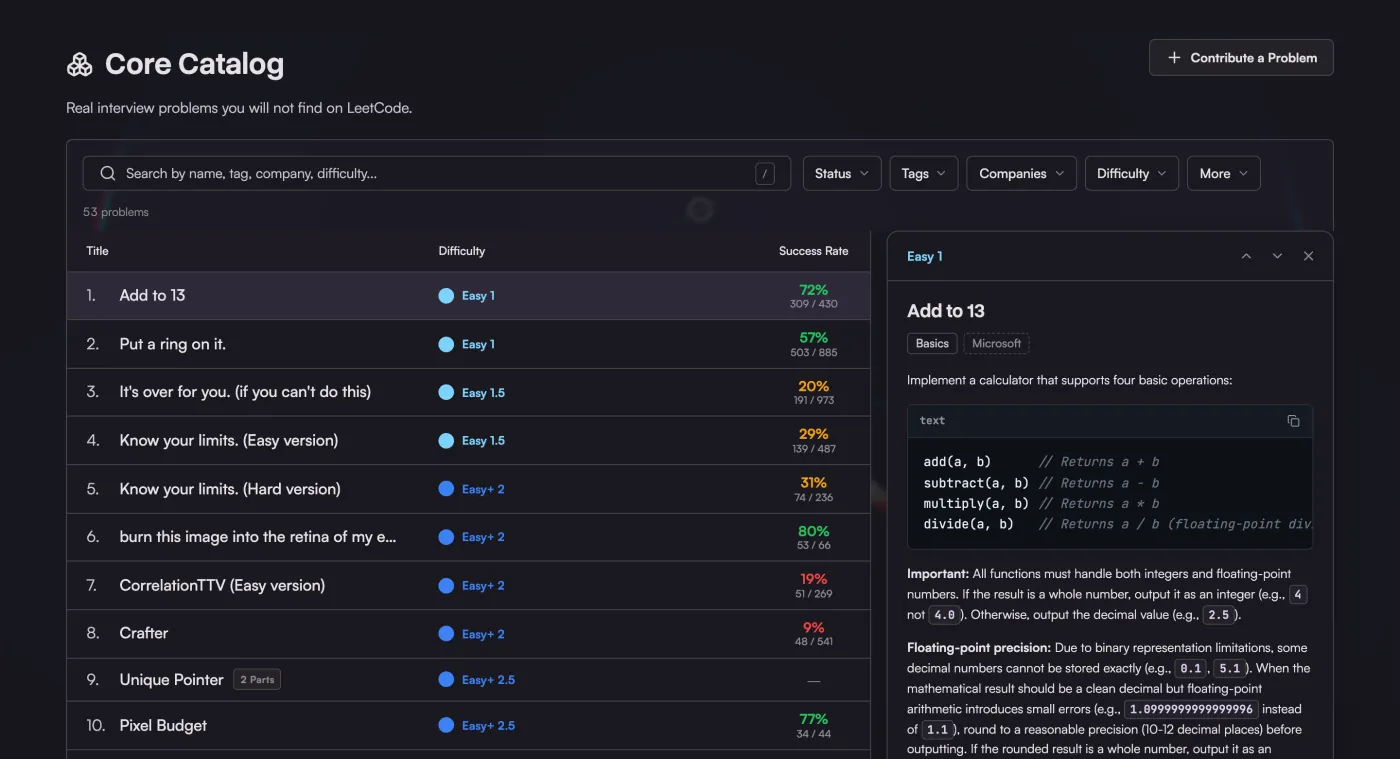
- The top of the Core Catalog shows the problem you were last on, with a Continue button and two suggestions for what to try next.
- Improved
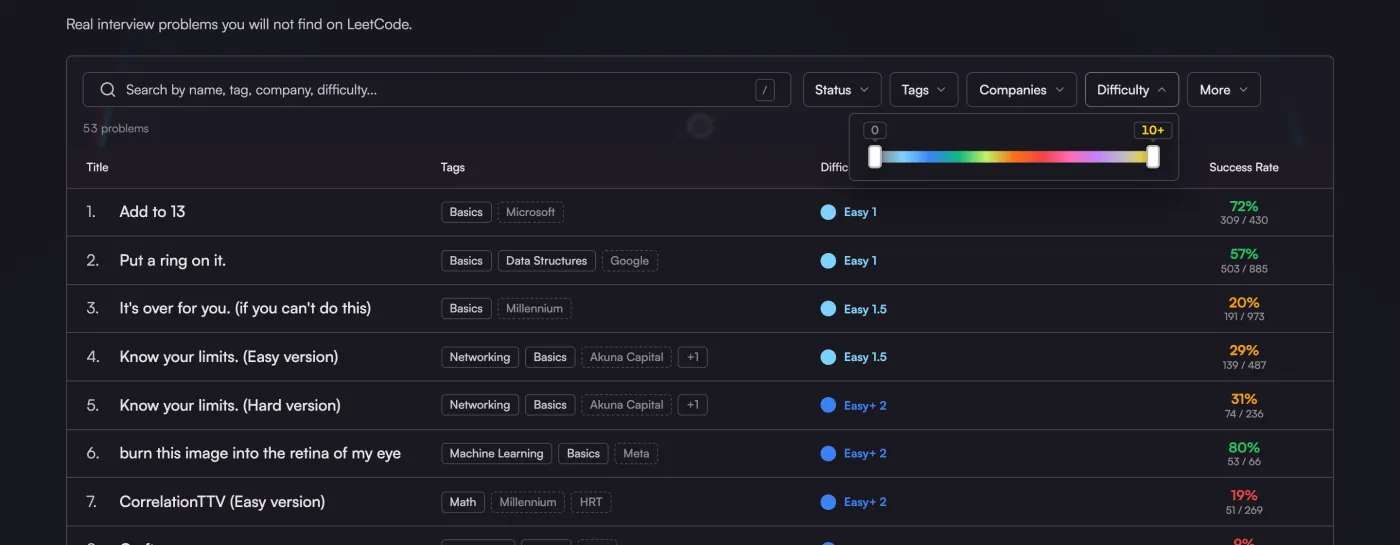
Catalog filters are a row of menus for status, tags, companies and difficulty, and moving between them slides one panel across.
- After a run, the verdict shows runtime and memory on one line, and Test Result shows how many cases passed.
- Sample cases sit under simple labels with a copy button, and the problem header has fewer boxes.
- Test Result keeps this visit's runs above the results, so you can look back at an earlier run.
- Test Result shows input, expected and your output in the same style as the sample cases.
- Editor buttons show a short tooltip with their keyboard shortcut.
- The problem editor has sliding tabs and lighter fields for constraints, examples and hints.
- The Core Catalog shows how many problems your filters leave.
- Core Catalog filters stay in the address, so Back returns to the same view and a link opens it. Press / to search.
- Success rates stay neutral until a problem has 10 submissions.
- Core Catalog sort opens the same menu as the filters beside it.
- Every filter menu in the Core Catalog and Domain Knowledge shows how many items each option leaves, counted with your other filters.
- The Core Catalog and Domain Knowledge headers drop Contribute a Problem; Interview Intel's Share yours is where reports turn into problems.
- Fixed Formulas Codeforces draws as pictures read on dark themes in imported statements and CPguessr.
- Submissions show a dash for runtime and memory that a compile error never measured.
- Solvers name the language the way the rest of the site does (C++17, Python), and long names have more room.
Mock Interview & Intel
- Improved Interview Intel has a toolbar with report types, a company menu and search, so reports use the full width.
- Fixed A long role and round on an Interview Intel card stays on one line on phones.
- Interview Intel cards use both preview lines for the report, instead of a blank line and an ellipsis.
Resume Reviewer
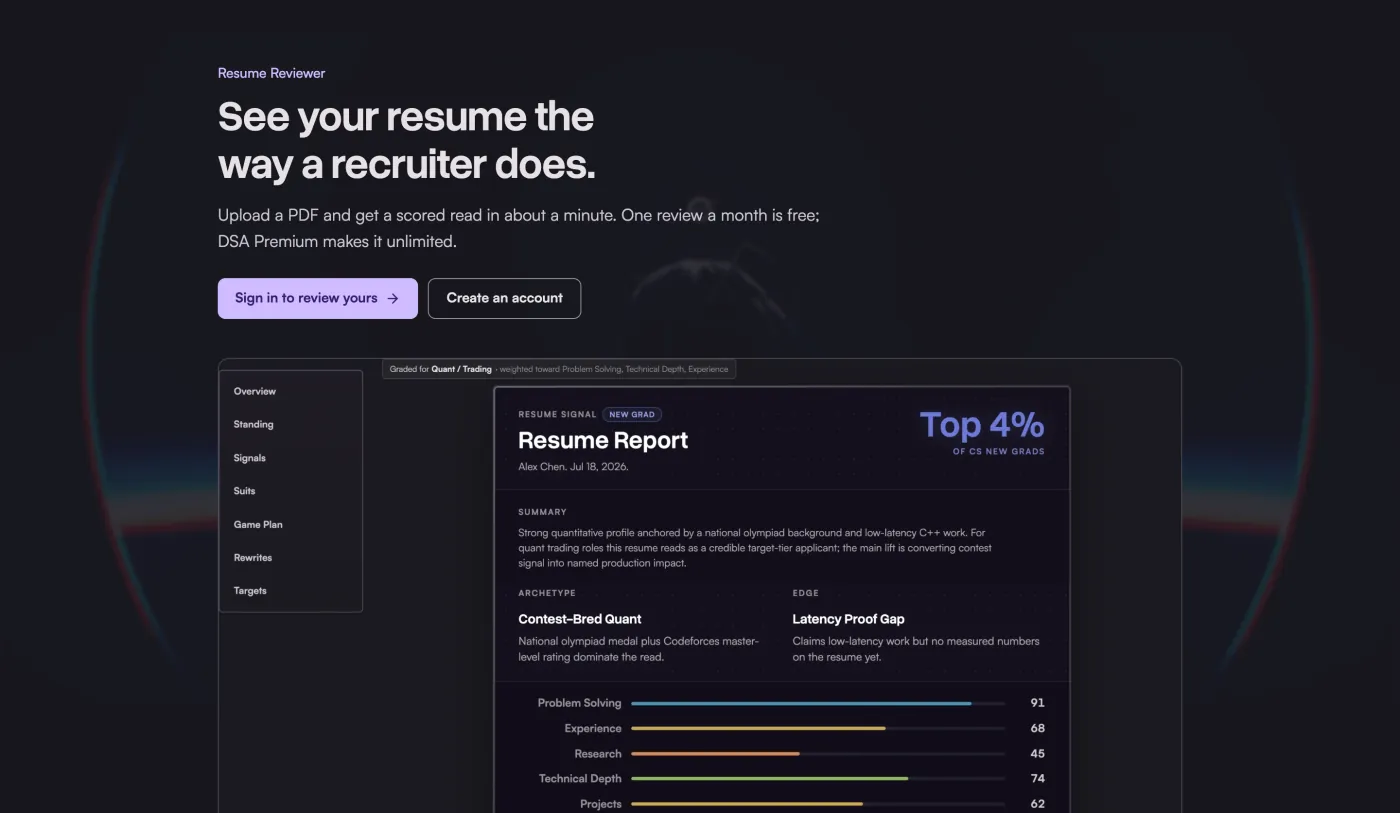
- New The home page shows the Resume Reviewer, with a real report on a sample resume, below Interview intel.
- Setup can start you on a resume review, and every report ends with Build my plan, which carries it into White Room as your first ask.
- Improved
Signed out, Resume Reviewer shows a sample report before asking you to sign in.
Domain Knowledge
- Improved Domain Knowledge filters by status, module, tags and difficulty with the same menus as the Core Catalog.
- Signed out, a Domain Knowledge question shows its answer choices, locked, above a slim sign-in bar.
Guides
- New
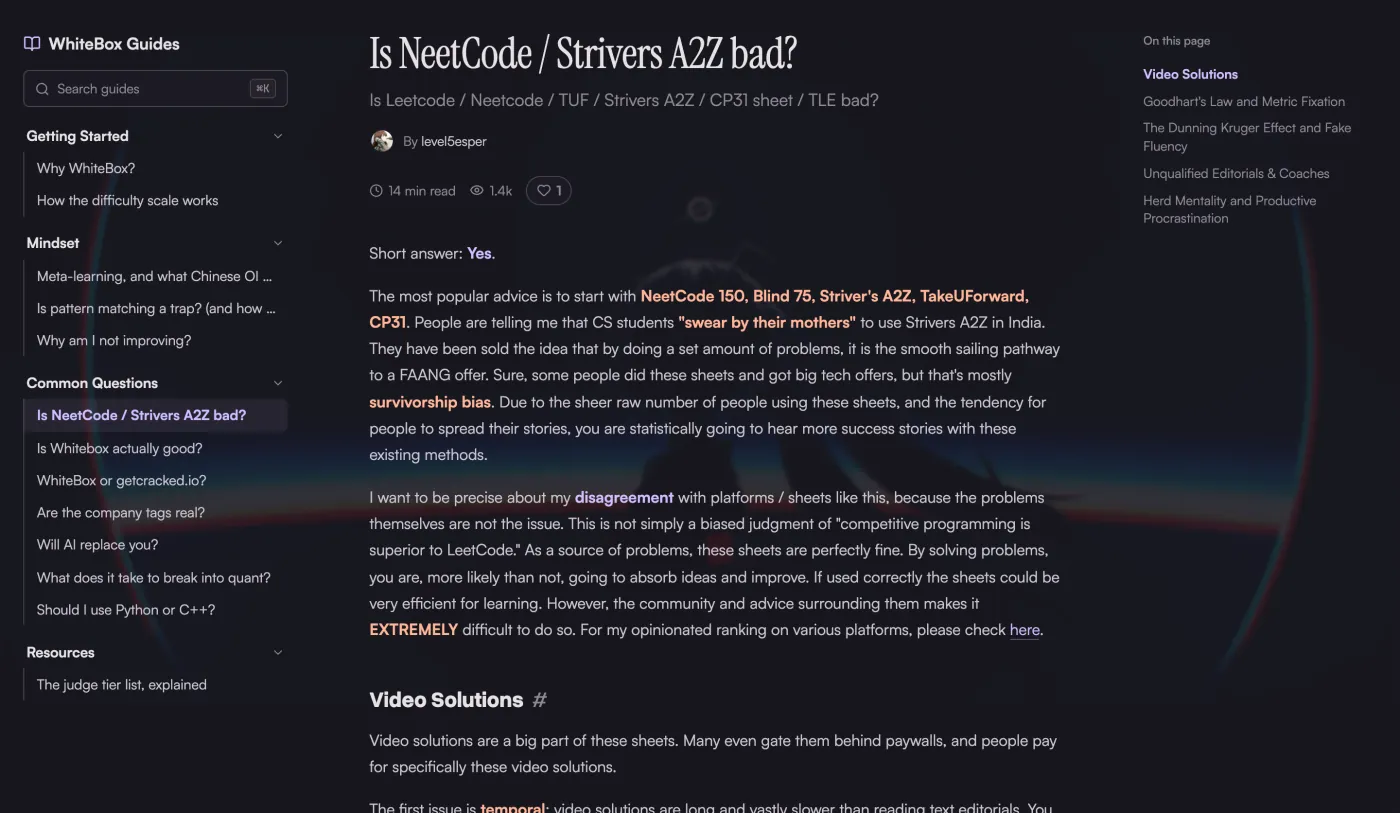
Hover a guide heading to copy a link to that section.
- Improved Library folders are one list you can scan from top to bottom.
- Guides read in a narrower column with simpler tables.
- Guide titles are set in a serif, like a paper.
- Guide diagrams keep a readable size on phones and scroll sideways inside their frame.
Rewards & Cosmetics
- New Upgrade spare cosmetics: every five spare copies of one rarity become one item of the next, one you do not own yet. You always keep a copy of everything.
- A Featured Box with six picks each week. One box in five lands on a pick you do not have, and the tenth box in a row always does.
- A Collection tab lays out every frame and title by rarity, shows where to get the ones you are missing, and pays coins once for each row you finish: 300 for commons up to 12,000 for mythics.
- A mythic pull takes over the screen: the card cracks, shatters and lands with fireworks, from a single box or a batch.
- Improved Buying a cosmetic outright costs one price per rarity, from 400 coins for a common to 12,000 for a mythic.
- The Rare Box is no longer sold. Rare Boxes you already have still open, and its items can be bought outright.
- Rarity labels in the shop and box openings read in sentence case.
- Opening several boxes deals cards that turn over one by one, with the best pull last, and box reels show only items that box can drop.
- A box you buy opens right away. Past ten, the rest wait in Unopened Boxes.
- Opening several boxes now gathers the cards in a pile that glows in the color of your best pull. A legendary gets the spotlight, a flash and a burst of stars as it turns.
- A mythic upgrade takes ten spare legendaries; every other upgrade still takes five.
- Fixed Box openings now cover the navigation bar instead of sitting under it.
Membership
- Improved One Annual/Monthly switch above the plans sets both paid plans at once.
- On a phone, each plan opens on its starred features, with a button for the full list.
- See what's inside shows each plan signed in, as you would use it: eight Free screens and ten for Ultra Premium, now including DSA practice, the weekly check-in, practice interviews and resume reviews.
- Pricing shows two plans, Free and Ultra Premium. DSA Premium is still on sale from the line under them, for anyone who only wants adaptive DSA practice.
Profile & Community
- Improved
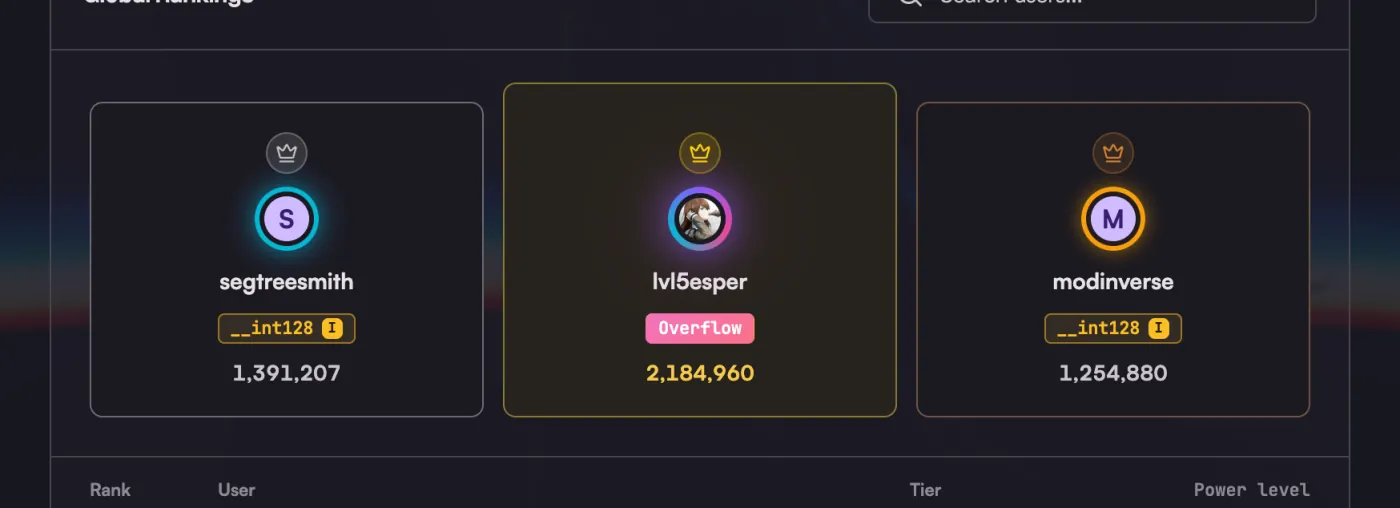
The leaderboard has a podium for the top three, and profiles put Follow and Share beside your name.
- Messages open beside your conversation list, and a conversation groups each run of messages with a label for every day.
- Notifications fold each day of coins and streaks into one row, so messages stand out.
- Following shows each person as a card with their power level and when you followed them.
- A burst of roadmap ticks shows as one row in Recent Activity, with a count and the first names.
- The footer links to the YouTube and TikTok accounts of @level5esper and @meemee.ac, next to their Instagram.
- Fixed On a phone, every profile figure shows in a grid, and Best Solves puts the difficulty above the title so the chips share a line.
- The figures under a profile's power level spread across the whole card.
Platform
- New
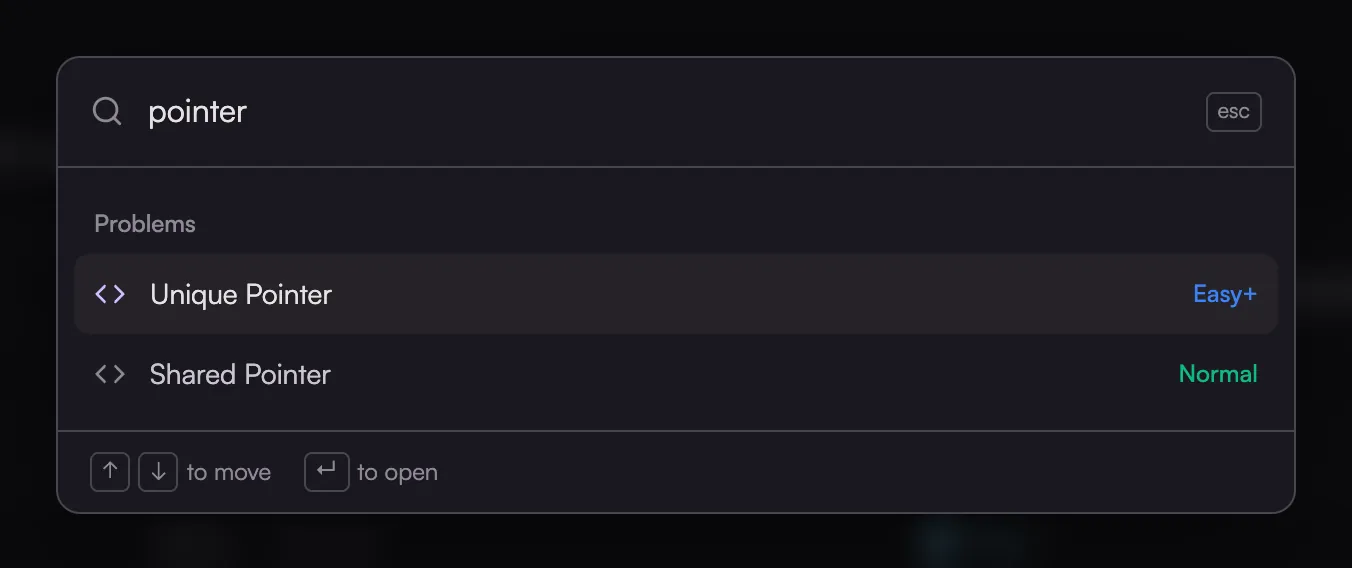
Search the site with ⌘K or Ctrl+K: problems, guide sections and pages in one list you can move through with the keyboard.
- An optional sidebar in Settings > Appearance lists every page on the left and folds to icons with ⌘\.
-
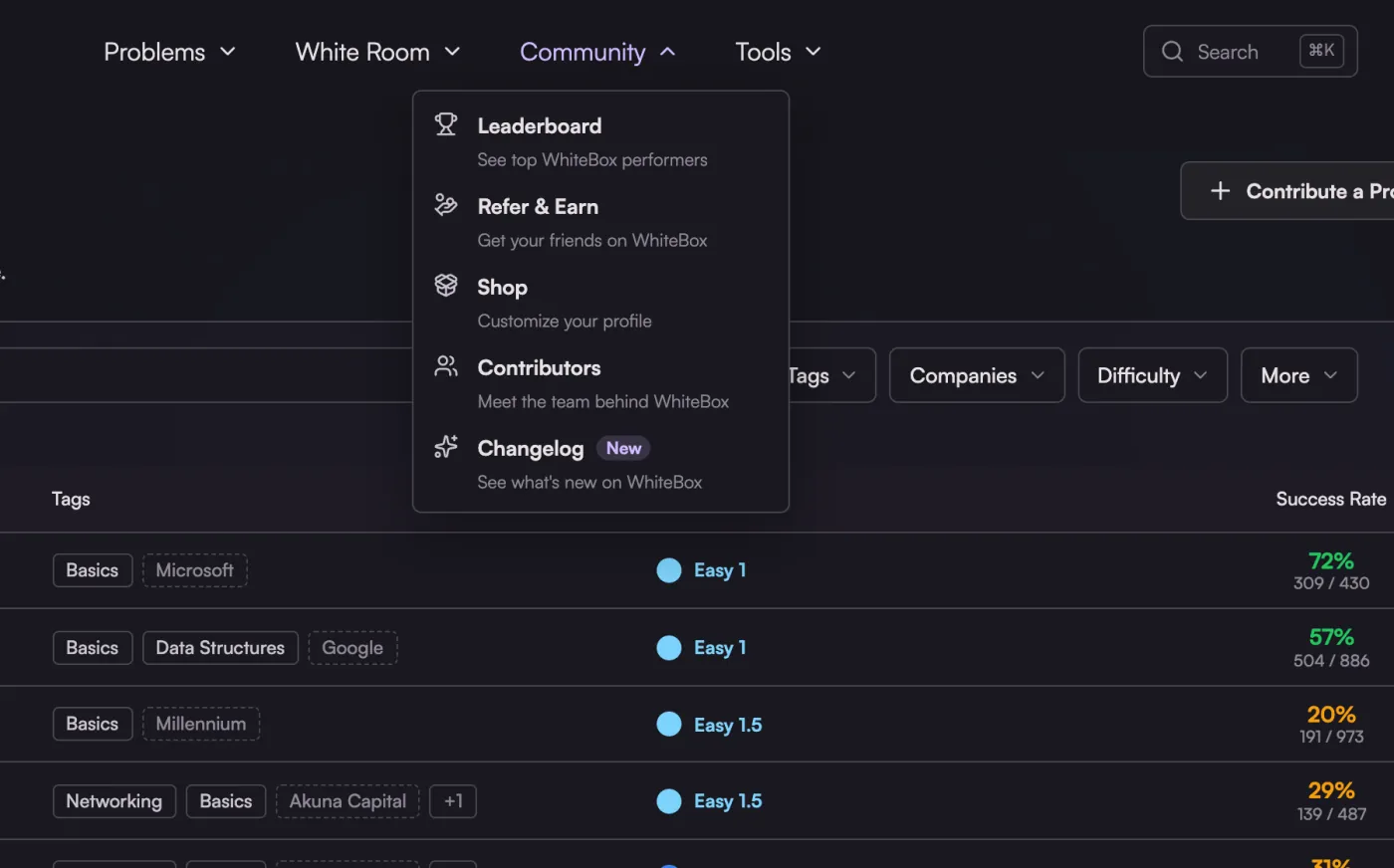
Changelog shows a New tag in the Community menu when something shipped since your last visit.
- Tap the glass behind the home page headline five times and the tile breaks.
- The footer is one wide painting of Hako's study at night: a train crosses the bridge, her hair stirs in the breeze, city lights switch on and off, the river ripples and the hollow cube on the desk turns. In the light theme it is the same scene in the morning. It fits the footer at any width, and reduced motion keeps the still.
- Improved Navbar menus slide from one to the next instead of stacking up, and tabs slide to the one you pick.
- Labels across the site use sentence case instead of small uppercase code type, while scores and ratings keep their numeric style.
-
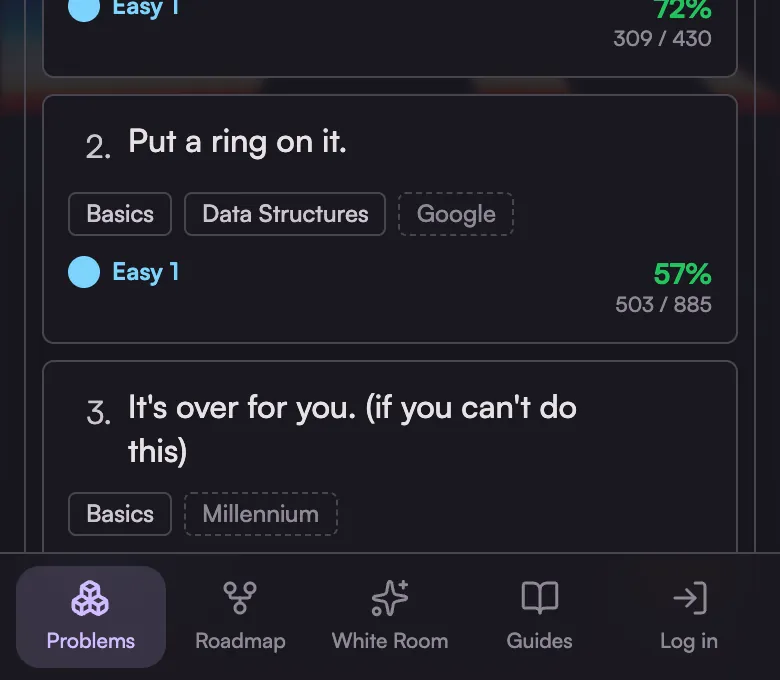
On phones, a tab bar at the bottom reaches Problems, the roadmap, White Room and Guides in one tap.
- Settings shows your account, prep profile and plan as plain rows, with the plan's renewal, price and card in one list.
- Toast messages match your palette instead of bright colored boxes.
- The shop has a new icon: the box you open there.
-
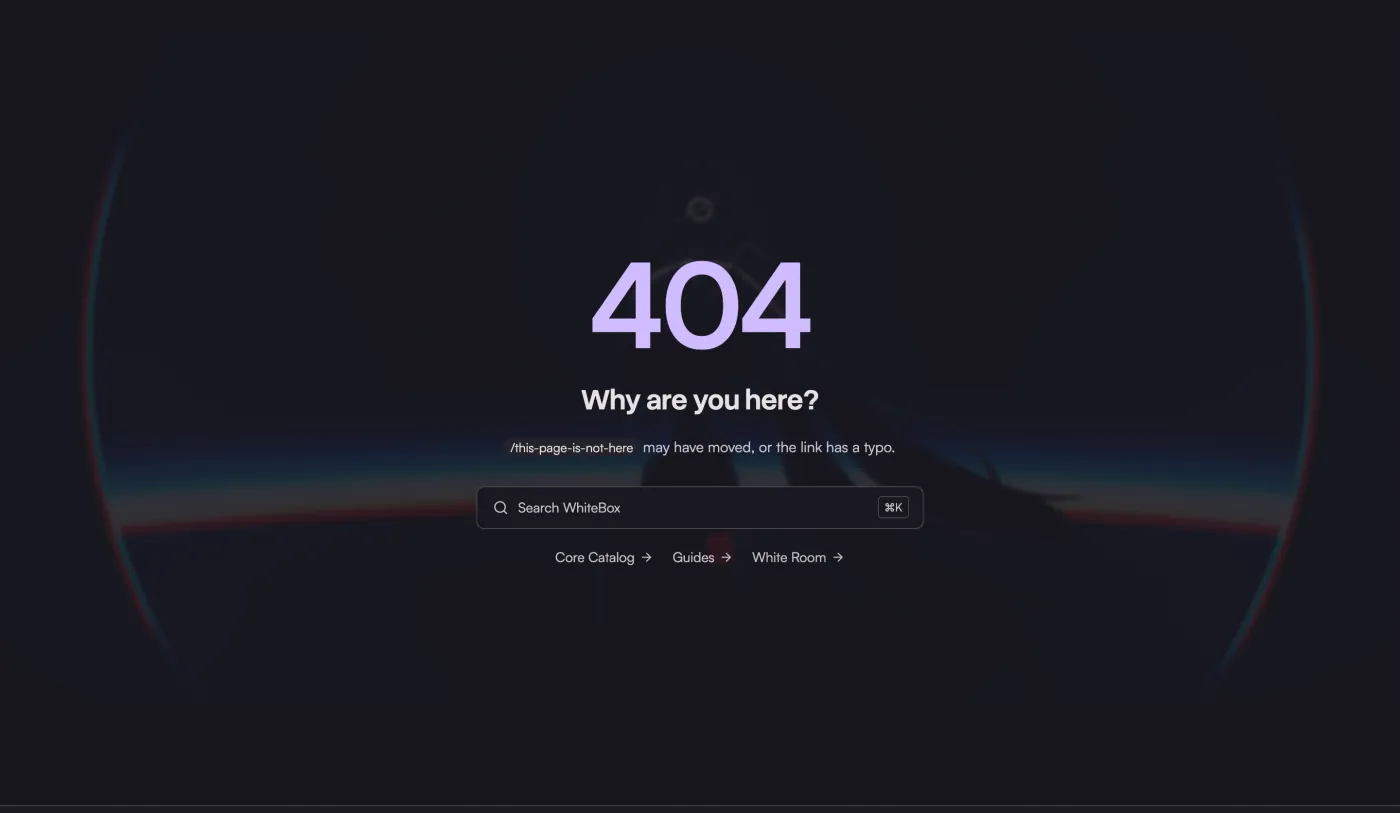
Setup starts on the first question, and a missing page offers search and the places you most likely meant.
-
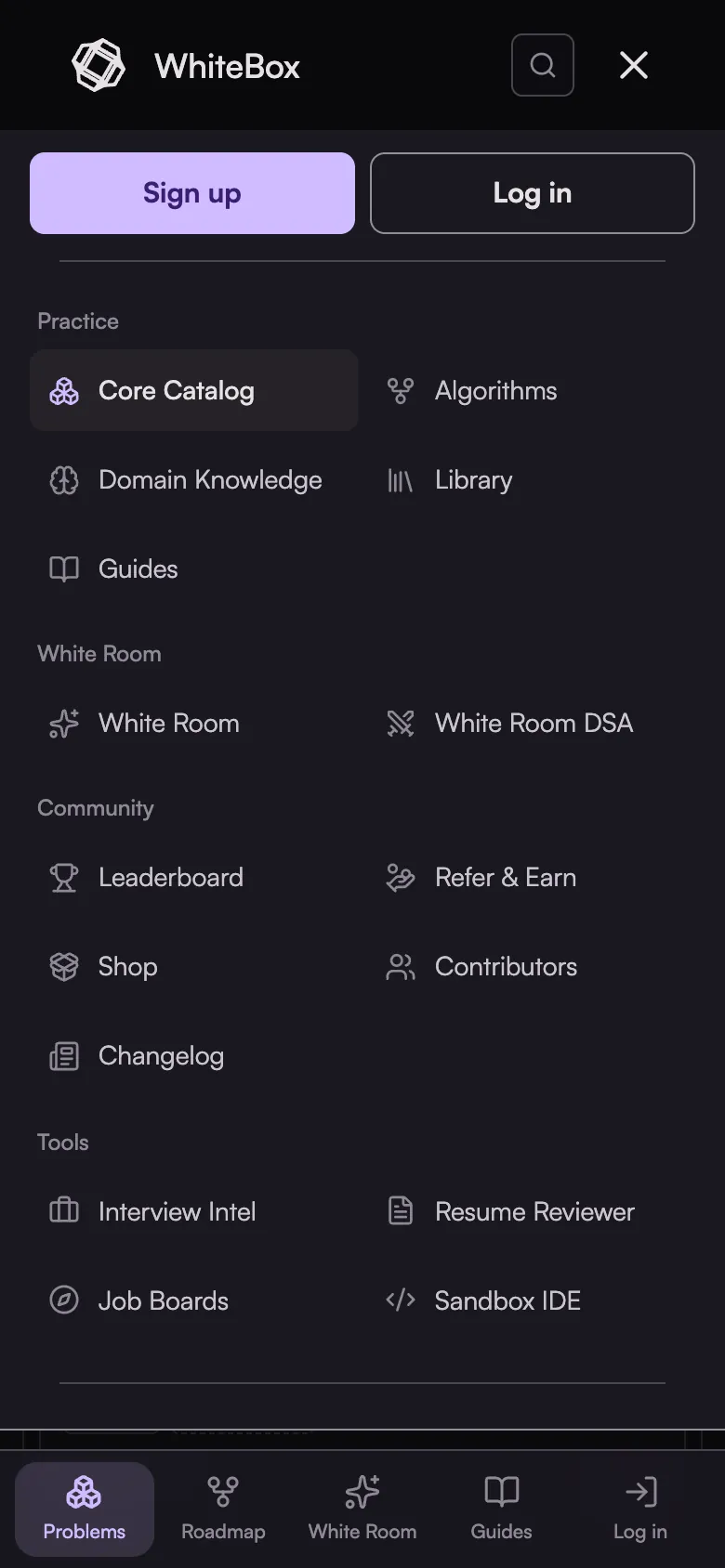
The phone menu lists every page in groups, and sign-up asks for your email first and suggests a username from it.
- The home page shows the companies WhiteBox users got offers from right under the headline, and its sections share one column.
- Open a line in the changelog to see a screenshot of the change.
- The Community page lists the same places as the Community menu, each with a line on what it is.
- A Domain Knowledge module opens with its introduction, and its cards are shorter on phones.
- Privacy and Terms have a contents list to jump between sections.
- The resume upload comes first, the catalog suggests what is next after a solve, and Cosmetics tabs sit in a grid on phones.
- The home page showcase keeps one size as it changes between problems.
- Screen readers name every search box, close button and vote arrow, and the phone menu shows keyboard focus.
- The home page showcases dissolve into each other as they change.
- Dropdowns in Contribute, White Room settings, room setup and collections open a themed list with a filter on long ones, instead of the system menu.
- Settings on a phone is one row of section pills, so the section starts right under the title.
- On phones, catalog cards take two lines, the leaderboard totals share one row, the contests calendar buttons sit side by side, and the home buttons share one width.
- The changelog has a chip for each area, with how many lines it holds.
- On the home page the coach map fills its card and the roadmap preview fades where it runs off the screen.
- Fixed A referral link no longer covers the navigation bar with its banner.
- Opening Files in a notebook no longer hides its title and the left of every cell.
- Quiz questions say where Back goes, and question titles with code read as one line on phones.
- On phones, a direct message can be typed again: the message box sat behind the bottom tab bar.
- The Quests tab is a slim edge handle on phones, so it no longer covers buttons and text.
- Links in Interview Intel reports open, and a profile link with capital letters finds the profile.
- Light themes color accent text in a darker shade, so links and labels in the accent color are easy to read.
- Menu blur works in Chrome, Edge and Firefox, and the phone menu button stays on screen when you are signed in.
- Contribute, Refer & Earn, the shop and Domain Knowledge fit a phone screen without sliding sideways.
- Deleting a collection, a solution or a column asks in WhiteBox's own dialog, which Escape closes.
- Error pages say why a page is closed to you, and a missing problem keeps the navbar.
- Prep profile in Settings shows the answers you picked at onboarding by name.
- Settings and your profile show your name and picture as soon as the page opens.
- On Android phones the menu scrolls to its last link, the problem editor fits the screen, and the home tour's code and roadmap pan sideways.
- On phones, toasts, the welcome missions card and Hako sit above the bottom tab bar instead of under it.
- Navbar menus keep each description on one line, and AI-dle stops printing a model's family twice.
September 2026
Daily games, multi-part problems, and a memory that ranks your skills
White Room
- Improved Memory shows a rank for every skill you practise, from Initiate to Master, with the evidence behind it, shared between White Room and DSA practice.
- The White Room About page is now a live tour of the workspace instead of a wall of screenshots.
- Fixed White Room paints the workspace on the first frame on a phone instead of a blank strip.
Roadmap & Practice
- New CPguessr: a daily game where you read a Codeforces problem and guess its rating, scored by how close you land.
- AI-dle: a daily game in the quest drawer where you work out which AI model is behind a set of benchmark scores.
- Contest calendar: upcoming rounds from the major judges in one list, with a feed you can add to your own calendar.
- Improved Collections are now personal: your own lists, plus any list you were already working through.
- Fixed CPguessr is back after a stretch without a daily puzzle, with puzzles now prepared well ahead.
Problems & Editor
- New Multi-part problems: some problems are split into Parts, and a submission that already solves later Parts credits them too.
- Return Routing Engine: a debugging problem modelled on an Amazon online assessment, with an assistant that explains without handing over the fix.
- Improved Catalog rows are half the height, so you see fifteen problems at a time instead of six.
- Success rate colour is tuned to this catalog rather than to LeetCode, so green means a problem most people finish.
- Company tags read differently from topic tags at a glance.
- A cleaner problem page: one chip style, a compact editor toolbar, and an orange Submit button.
- Fixed Run and Submit no longer ask a signed-in user to sign in again after a short idle.
Resume Reviewer
- New Saved resume reviews keep a preview of the PDF you uploaded.
Guides
- New Ask the White Room coach about any passage in a guide.
- Improved Guides moved into a library layout with clearer sections.
Membership
- New DSA Premium: adaptive practice, solve history, weak topics, judge sync, and unlimited resume reviews for $9 a month or $79 a year.
- Improved The top plan is now Ultra Premium, and each plan card leads with its standout feature.
Profile & Community
- Improved The jobs page now links straight to five curated job boards.
Platform
- New Twelve new wallpapers from the Omarchy themes, with the picker capped until you ask for more.
- Hako, the WhiteBox mascot, drops by now and then with a shortcut into White Room. Switch her off in Settings.
- Fixed The homepage showcase no longer sits behind a black rectangle when the page loads in a background tab.
August 2026
A rebuilt coach workspace and a platform-wide reliability pass
White Room
- New Coach memory you can read and edit: a browsable document tree, a history of every consolidation run, and controls for what the coach keeps.
- Slash commands in the composer: /memory shows what the coach knows, plus /today, /roadmap, and /stats.
- The rooms rail slides out when you reach the left edge, so the workspace keeps its width while you work.
- Improved Rebuilt chat: full-width coach replies, a New chat button, and finished turns that collapse to a single line.
- Today shows less and says more, with the day plan and coach actions trimmed to what you act on.
- Settings moved into one place, with coach behavior, memory, and workspace preferences that persist across devices.
Roadmap & Practice
- Fixed Rerolling a daily quest can no longer reopen one you already completed.
Problems & Editor
- Fixed Saving a problem no longer discards test cases you did not edit.
- Running code, saving notebooks, and unlocking test cases keep working after a long idle instead of asking you to sign in again.
- The submit banner reports the XP you actually earned.
Rewards & Cosmetics
- Fixed The daily fortune is one claim a day for everyone, on one shared reset.
Membership
- Fixed Gifted premium days add up correctly when several arrive at once.
Platform
- New Dust Gray theme, a neutral palette that keeps colour for status rather than decoration.
- Improved Navigation menus, progress rings, and settings share one set of sizes, icons, and alignment.
- Fixed No more background flash on load when you are on a newer theme or wallpaper.
July 2026
Collections, the Dan Ladder, and a shared White Room
White Room
- New Shared free preview room so anyone can see the coach in action before subscribing.
- AtCoder and oj.uz problem sources, with one focused practice platform per plan so judges never mix.
- Improved Coaching questions now run on a dedicated turn tier for sharper answers at lower cost.
Roadmap & Practice
- New Problem collections: build favorites, redo, and review lists with a progress tracking table.
- Verified Dan Ladder: ten dans of curated AtCoder problems, link your account to earn the rank on your profile.
- Import problems by URL from CSES, AtCoder, Codeforces, and USACO straight into your collections.
- Osu-style difficulty range slider to filter the roadmap and catalog to an exact rating band.
- Personalized daily quests tuned to your level, plus a new quest to redo the quiz questions you missed.
- Improved New members now land straight on the algorithm roadmap with a day-one mission card.
- Roadmap progress orb and problem counts now follow your active filters.
Problems & Editor
- New Custom assertion harnesses: one-click templates, per-assertion pass and fail reporting, and spend coins to reveal what a failed assertion checks.
Mock Interview & Intel
- New Animated mock interview demo on the landing page.
Resume Reviewer
- Improved Recalibrated scoring that credits the evidence you show instead of penalizing missing credentials, and reads a top-tier offer as a world-class signal.
Domain Knowledge
- New New domain knowledge question sets covering math and recent machine learning interview intel.
Rewards & Cosmetics
- New Blackjack table: bet your coins against a server-dealt shoe.
- Global sound system with a volume setting plus solve, quiz, and reward cues.
- Theme-integrated rarity tokens and a vault-terminal box opening animation.
- Improved Referral premium-day rewards now surface across the invite screen, the shareable card, and its preview image.
Profile & Community
- New Linked-account badges on your profile that consolidate your external competitive accounts.
Platform
- Improved Faster profile and problem pages from leaner database hot paths.
- Fixed Sandbox judge failures reliably fall back to Judge0 with no raw error leaks.
June 2026
White Room goes public
White Room
- New White Room opened to every signed-in user, with a premium access boundary.
- Structured onboarding wizard grounds your very first plan in real goals.
- Projects tab: personalized project recommendations with mini schedules.
- Async background plan builds: get an instant room and resume when it is ready.
- Improved Native web search with citations on direct questions, plus learner-memory dedup so the coach stops repeating itself.
Roadmap & Practice
- New Level-ordered list view for the algorithm roadmap.
Problems & Editor
- New Vercel Sandbox execution provider for problem runs, with address sanitizer support and warm sandbox reuse for faster submissions.
- Improved Syntax-highlighted submitted and solution code.
Mock Interview & Intel
- New Animated product tour showcase on the homepage.
Resume Reviewer
- New Private-by-default reports with revocable share links and delete.
- Improved Recalibrated scoring with percentile bands and a breadth blend, shown on an interactive score curve.
Guides
- New Guides section: consolidated, rewritten, and published, with a right-rail table of contents and scroll-spy.
- In-product admin markdown editor with author bylines, descriptive slugs, and draft mode.
Rewards & Cosmetics
- New Reward popups for every XP source, with coins you can spend in the shop.
Membership
- New Five-day premium trial with card-reuse abuse prevention.
- Native cancel and reactivate flow with a monthly and annual billing toggle.
Profile & Community
- New Account settings to change your email and password.
- Following page with mutuals, and AtCoder account linking from settings.
Platform
- New Baseline security response headers.
- Fixed Connection-pool starvation that slowed the whole site under load.
May 2026
The AI coach takes shape
White Room
- New AI coaching workspace: an adaptive roadmap you build together with the coach.
- Infinite hex-grid roadmap with day-structured plans.
- Session artifacts and durable learner memory.
- Context sources: feed the coach your linked profiles and files.
Roadmap & Practice
- New Library: a curated hub of the best DSA and system design resources.
Mock Interview & Intel
- New Rebuilt mock interview suite: structured rounds with transcription.
- Candidate rating radar with hoverable scores.
- Job board search.
Rewards & Cosmetics
- New Referral system: a five-tier ladder with gacha gift boxes.
Profile & Community
- New Ranking v2 and profile progression.
- Improved Leaderboard stats redesigned into stat cards, plus contributor cards on the community page.
Platform
- Improved Migrated every LLM call from Anthropic to OpenAI.
April 2026
WhiteBox launches
Roadmap & Practice
- New DSA algorithms roadmap with an admin editor.
- FAANG vs Cracked roadmap tier toggle.
- "Plan with AI" button on the algorithm roadmap.
- Workbooks: your first custom problem lists.
- Per-problem discussion threads.
Problems & Editor
- New Coding problems, a code editor, and Judge0 execution.
- Multi-language support with dynamic per-language harnesses, including C++20 and C++23.
- Tsuki: the in-editor AI problem assistant, with a Monaco editor and inline diff highlights.
- Custom test cases with an execute button.
- ZIP file test-case uploads and batched Judge0 submissions.
- Vim mode, per-problem time and memory limits, and more languages.
- Submission speed histogram.
- LeetCode catalog and an auto-save queue.
- Submission rate limiter.
Mock Interview & Intel
- New Structured mock interviews with multiple round types and speech recording.
- System design whiteboard for architecture rounds.
- Interview question buckets.
- Interview Intel: a feed of real interview reports with a review pipeline and a contribute flow.
- Our Philosophy manifesto page.
Resume Reviewer
- New AI resume reviewer, with shareable report URLs and a free tier.
- Percentile ranking against the pool with seven recruiter signals, plus an admin panel with one-click backfill.
Domain Knowledge
- New Domain knowledge quizzes, with mass upload and AI drafting modes for authoring.
Rewards & Cosmetics
- New Loot boxes, avatar frames, and a cosmetics shop with an editor for animated titles.
Membership
- New Stripe payments, coupons, and bulk premium gifting.
Profile & Community
- New Profiles with the hexagon power graph, PP scoring, and a leaderboard.
- Community pages, contributors, and public profile routes.
- Growth dashboard for admins, first-solve bonuses, and a solvers tab.
Platform
- New Clerk authentication, an admin panel, and separate production and dev environments.
- Job board, notifications, and direct messages.
- Granular permissions system and search-engine optimization across the site.